


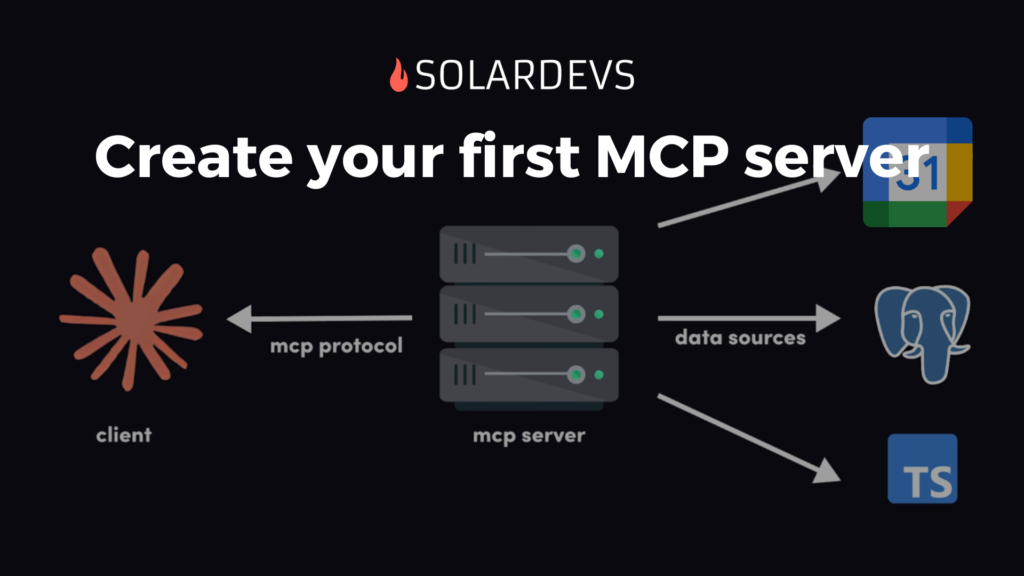
How to Create an MCP Server for Your Application
Published: 15 January 2026
TLDR; MCP servers let your AI agents talk to your apps, databases, and tools—without building custom integrations for everything. Here’s how to build one (or let us do it for you).
Why You Should Care About MCP Servers
Picture this: Your AI assistant can pull data from your CRM, search your databases, generate reports, and trigger workflows. All without you building a new integration every single time.
That’s what Model Context Protocol (MCP) servers do. They’re basically smart gateways that let AI agents safely access your business systems.
Anthropic introduced MCP in late 2024, and it’s quickly becoming the standard. Instead of building integrations for every AI model × every tool (the old “N × M” problem), you build one MCP server and it works everywhere.
Bottom line? You deploy AI faster, spend less on development, and get AI agents that actually do useful stuff.
How MCP Servers Work (The Simple Version)
An MCP server does four main things:
- Exposes tools — Tells AI agents what it can do (search docs, query databases, etc.)
- Handles security — Keeps your data safe with authentication and encryption inside your infrastructure (you are hosting the MCP server after all)
- Manages context — Remembers conversations so AI can have multi-step interactions
- Uses a standard protocol — JSON-RPC 2.0, so everything talks the same language
That’s it. Simple concept, powerful results.
How to Build Your MCP Server (5 Steps)
Feeling overwhelmed? We can handle this for you. But if you want to DIY, here’s the roadmap:
Step 1: Figure Out What You Need
Start with the problem, not the tech. What do you actually need?
- Internal knowledge assistant? (Search company docs, wikis, etc.)
- Customer support bot? (Access CRM, tickets, billing)
- Sales automation? (Pull data from multiple sources)
- Something else?
Write down what the AI should do and what data it needs. Keep it simple.
Step 2: Pick Your Tools
Language options:
- Python (great for data/ML stuff)
- TypeScript/Node.js (perfect for web apps)
- Go/Rust (if you need speed)
Where to host:
- Cloud (AWS/Azure) = easy but costs money
- On-prem = full control but you manage it
- Serverless = cheap but limited
Stuck? We can help you choose based on what you already have.
Step 3: Build the Server
You’ll need to:
- Define what tools your server offers (the manifest)
- Write the code that handles requests
- Connect it to your actual systems (databases, APIs, etc.)
Here’s a quick Python example:
from mcp.server import Server
from mcp.types import Tool, TextContent

server = Server("my-company-mcp-server")

@server.list_tools()
async def list_tools() -> list[Tool]:
    return [
        Tool(
            name="search_documents",
            description="Search internal knowledge base",
            inputSchema={
                "type": "object",
                "properties": {
                    "query": {"type": "string"}
                }
            }
        )
    ]

@server.call_tool()
async def call_tool(name: str, arguments: dict) -> list[TextContent]:
    if name == "search_documents":
        query = arguments.get("query")
        results = search_knowledge_base(query)  # Your logic here
        return [TextContent(type="text", text=results)]
Step 4: Add Security (Don’t Skip This!)
MCP servers can access sensitive data. You need:
- Authentication (OAuth 2.0 or API keys)
- Access control (only give access to what’s needed)
- Encryption (TLS/SSL)
- Input validation (prevent injection attacks)
Common mistakes:
- Giving too much access “just in case”
- Skipping input validation
- Assuming “internal” means safe
Security not your thing? We can help make it bulletproof.
Step 5: Deploy & Watch It
Deploy wherever makes sense (cloud, on-prem, serverless). Then monitor:
- What tools are being used
- Any errors or failures
- Performance metrics
Set up alerts so you know when something breaks.
Real Examples (So You Get It)
Knowledge Assistant: Employees waste hours searching docs. MCP server searches wiki, Confluence, and Drive in one go. Result: 70% less time searching.
Customer Support: Support can’t quickly see full customer history. MCP server pulls from Salesforce, Zendesk, and billing. Result: 50% faster resolutions.
Sales Automation: Sales team manually compiles prospect data. MCP server enriches leads, pulls history, generates pitches. Result: 3x more leads processed.
Common Mistakes (Save Yourself the Headache)
Giving too much access — Don’t give AI access to everything “just in case.” Only what’s needed.
Vague tool descriptions — AI agents need clear instructions. Be specific about what each tool does.
Skipping security — “It’s internal” isn’t a security strategy. Always authenticate, encrypt, and audit.
Deploy and forget — Monitor usage and errors. Set up alerts. Optimize based on real data.
Building something nobody uses — Start with a real business problem, not a cool tech demo.
Why Work With Us?
Building an MCP server that actually works takes more than coding. You need:
✅ AI/ML expertise (we get how agents think)
✅ Integration experience (we’ve connected everything)
✅ Security focus (your data stays safe)
✅ Business mindset (we care about results, not just code)
Real results we’ve delivered:
- 80% faster AI integrations
- 60% lower development costs
- 3x better AI accuracy
- Production-ready servers in weeks
Ready to Get Started?
Here’s how it works:
- You reach out — Free 15-minute consultation
- We chat — Understand what you actually need
- We design — Architecture, timeline, budget
- We build — From prototype to production
- You launch — With monitoring and support
What we can help with:
- Building your MCP server from scratch
- Specific integration challenges
- Security reviews
- Performance optimization
- Ongoing maintenance
Let’s Talk
📞 Phone: +52-56-2321-7155
📧 Email: contact@solardevs.com
🌐 Website: solardevs.com
Schedule a free call → Book Your Consultation
We’ll respond within 24 hours with a plan tailored to your needs.
Want to learn more about our services? Check out our DevOps Consulting and AWS Cloud Architecture offerings